
Appearance
Citations and Cross-References
Typora understands Pandoc's citation syntax. Your source stays plain Pandoc Markdown; the editor shows formatted citations and a bibliography, and export produces them too.
Citations are on by default (Settings ▸ Markdown ▸ Citations).
Syntax
| You write | You get |
|---|---|
[@doe2020] | A citation: (Doe 2020) in an author-date style |
[see @doe2020, p. 33; -@roe2019] | Several works with a prefix and a locator; -@ leaves out the author |
@doe2020 | A narrative citation: Doe (2020) |
@doe2020 [p. 33] | Narrative, with a locator |
@{ISBN 978-0} | A key containing unusual characters |
Keys follow Pandoc's rules. An @ inside a word (me@example.com) is not a citation, and trailing punctuation (@doe2020.) is not part of the key.
When the caret is on a citation you see its source with the keys tinted; elsewhere it shows the formatted text. A key that no source defines is underlined.
Bibliographies
Typora looks for references, in Pandoc's order:
bibliography:in the front matter — a path or a list of paths, relative to the document: BibTeX / BibLaTeX (.bib,.biblatex), CSL JSON (.json) or CSL YAML (.yaml). Without one, the Default Bibliography files from Settings ▸ Markdown ▸ Citations are used.references:in the front matter — CSL items written inline. They win over files.- Zotero — if Zotero is running with the Better BibTeX add-on, keys no file defines are looked up there, and Zotero items are offered while you type. Turn this off with Zotero in Settings.
yaml
---
bibliography: [refs.bib]
csl: apa
lang: en-GB
---
Citation style
csl: in the front matter picks the style for one document — a bundled style id such as apa, or a path to a .csl file. Otherwise the Citation Style setting applies: Chicago author-date (default), APA 7th, MLA 9th, Harvard (Cite Them Right), IEEE, Nature, GB/T 7714-2015 (numeric and author-date), or a custom CSL file. lang: sets the locale.
Inserting citations
Type @ to search: items from your bibliography come first, then the document's cross-reference labels, then Zotero results, then Pick from Zotero…, which opens Zotero's own citation picker.
Hover a formatted citation for a card with the full entry and an Open action (the attached file, DOI or URL).
The References tab
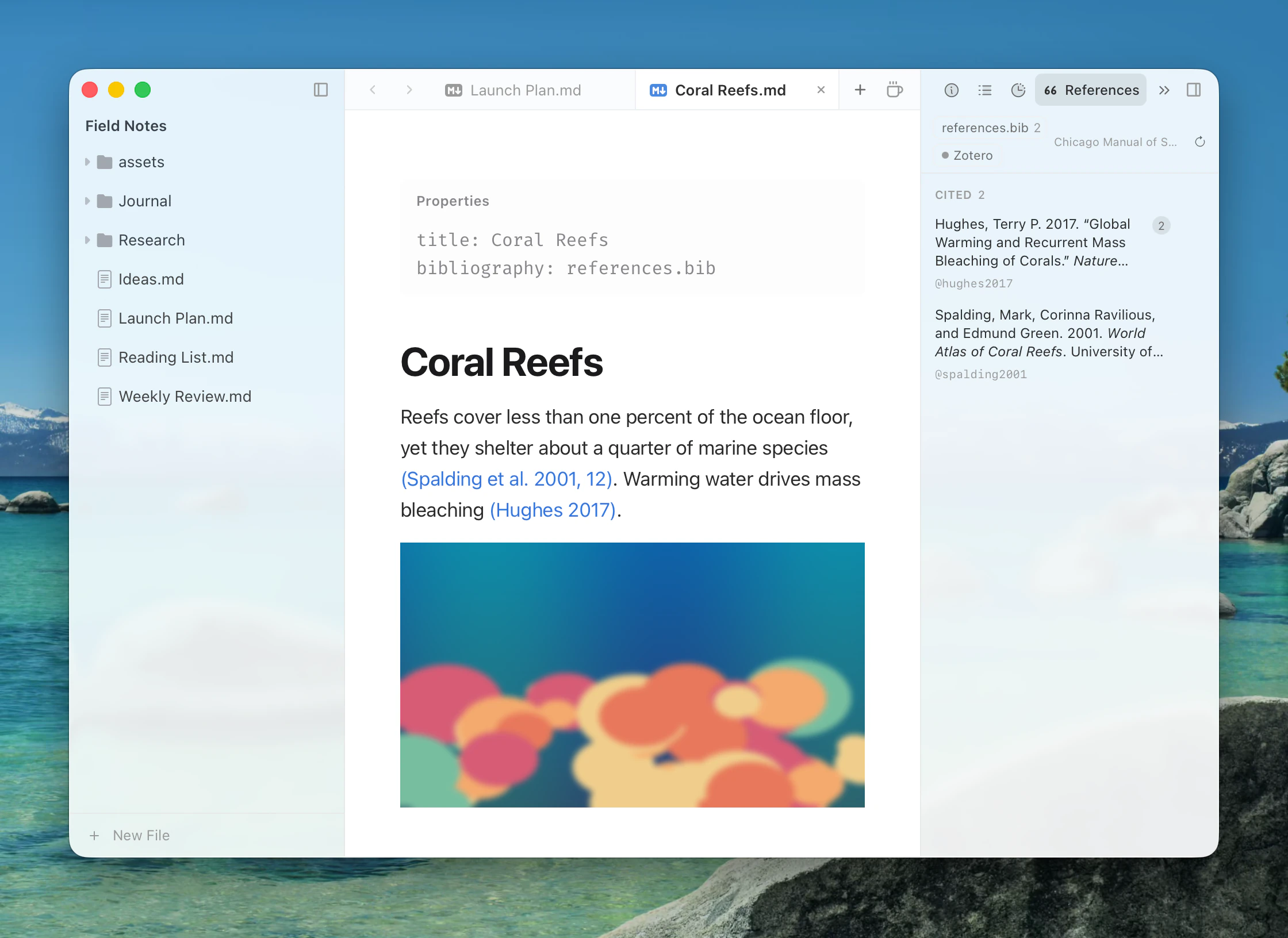
The References tab in the detail panel lists the works the document cites, formatted in the active style. Click an entry to find its next citation in the text; use its action to open the attached PDF, the DOI, the URL or the item in Zotero. Keys that weren't found are listed under Not Found. The reload button re-reads bibliography files.
Cross-references
Label figures, tables, equations and sections, then refer to them — compatible with pandoc-crossref and Quarto:
| Label | Example |
|---|---|
| Figure | {#fig:plot} |
| Section | # Introduction {#sec:intro} |
| Table | a caption line : Results {#tbl:results} |
| Equation | $$ E = mc^2 $$ {#eq:energy} (on the closing $$ line) |
| Reference | Renders as |
|---|---|
@fig:plot | fig. 1 |
@Fig:plot | Fig. 1 |
[@fig:a; @fig:b] | figs. 1, 2 |
@fig-plot (Quarto) | Figure 1 |
Prefixes are fig, tbl, eq, sec and lst. Labelled equations are numbered. Attribute blocks like {#id .class key=value} are kept exactly as written and shown as a small #id tag.
Export
- HTML, PDF and image export render citations as in the editor and append the bibliography.
reference-section-titleandsuppress-bibliographyin the front matter are honoured. - Pandoc exports (Word, LaTeX, EPUB, …) pass real citations to Pandoc with
--citeproc, including references that came from Zotero or the default bibliography, and labels become proper ids for pandoc-crossref.